Your developers' Claude Code,
anywhere, via your company server.
SSemBridge is a remote development console for Claude Code, built for enterprise developers. Once your company hosts the relay server on its own infrastructure, developers can view and control the Claude Code sessions they run in tmux on their own Macs from a desktop browser or the Mac, iPhone, and iPad app, through that server — sending prompts, approving permissions, answering questions, and interrupting. Alongside the sessions, they follow the work plan (WBS) and progress that Claude records for each repository, and answer what Claude asks right there.
 SSemBridgeConnected to server
Needs response 2WBS 1Tasks 1UsageManageSettingsNew session
WBS 1
User’s turn 2
The work plan Claude records — answer its asks right away
DesktopSession list, conversation, and the right panel side by side
PhoneThe same sessions in one hand — approve, answer, interrupt
Runs on your company server
SSemBridge is installed on a server your company operates. Developers keep using Claude Code on their own Macs as usual, and carry on with those sessions away from their desks through the company server.
Relayed by your company server
The web console, the relay, the display copy of conversations, and conversation backups all live on one company server. Remote control never goes through an outside cloud service.
Account secrets stay on each Mac
Claude credentials, Ollama keys, and company repository tokens are kept only on the developer's Mac. Even when logging in or entering a token from the web, the server only relays it and never stores the secrets.
Macs make outbound connections only
The Agent on each Mac connects out to the company server. No ports need to be opened on the Mac, and Agent connections are accepted only from the internal network (VPN).
Every remote command is audited
Who, which session, what, and the result are all recorded. The web console opens only after an ID, password, and OTP.
Admins manage people and company accounts
Admins create users (admins · developers) and handle temporary passwords · OTP resets · deactivation. They also set up the company's shared Claude · Ollama accounts and who may use them, the company model list, server settings, and retention periods.
Each developer sees only their own Macs
Developers see and control only the sessions · conversations · usage · backups · terminals of the Macs they registered. Not even admins can see other people's. When several people share one Mac, each macOS account is connected separately.
Claude Code's communication with the model (the Anthropic API and others) still happens directly from each Mac, independent of the console.
At a glance
Answer Claude's questions, check how much you've used, and hand work off to another Mac — without sitting at the terminal. The screens below are drawn with made-up sample data.
SSemBridgeWide on desktop, one-handed on phone
The same console works on any screen. In a desktop browser, the session list, conversation, and alerts sit side by side in three columns, with plenty of room for the file editor and usage dashboard; on a phone, the bottom tabs switch between Session, Alerts, Tasks, Usage, and Manage. The screens below are also drawn with made-up sample data.
Three wide columns, collapsible when needed
The session list on the left, the conversation in the middle, and the right panel — all on one screen. In the icon rail at the far right (approvals · hosts · prompts · events · issues · WBS · skills · repository), only the panel you click opens, so the page never gets long; collapse the session column and it becomes an icon rail (status color · elapsed time · approval count), giving the conversation more room.
- Edited files as line-numbered diffs, long output collapsed
- Times next to messages · a date line where the day changes
- This browser remembers what you collapsed
- ⌘↵ to send, drag and drop files
SSemBridgeConnected to server
Needs response 2Tasks 1UsageManageSettingsNew session
Swipe sideways to see more
WBS board
As Claude Code records the plan (phases · items · subtasks) and progress for each repository with the ssem-wbs tools, you see the summary · current position · progress by phase · timeline · table in real time. Every change is kept in the history, with who made it and when.
- Answer asks (approvals · tasks · decisions) on the spot — Claude reads them on its next turn
- No board yet: “Have Claude create a WBS”; with a board: “Hand to Claude” (sync progress · add task · wrap up WBS · start new WBS)
- Visible only to members (owner · editor · viewer) — not even administrators unless they are members
- Asks awaiting an answer are counted on the “WBS” icon; also opens in a new window
SSemBridgeConnected to server
Needs response 2Back to consoleTasks 1UsageManageSettingsNew session
Excluding conditional 64%
1 · 1 · 2
Done · code done · plan done
7 / 18
Of these, 2 for the user
1
Approvals 1 · Decisions 0
Swipe sideways to see more
File explorer and editor
Browse the session folder as a tree and edit two files side by side. Unlock, edit, and save with ⌘S; files Claude changes are reloaded right away.
- Markdown preview · image viewer
- Rename · duplicate · delete to Trash (no permanent deletion)
- Nothing inside .git or .claude can be edited
SSemBridgeConnected to server
Needs response 2Tasks 1UsageManageSettingsNew session
todo-app
A small web app that keeps your to-do list in sync across devices.
Getting started
npm installnpm run dev, then open it in a browser- Run tests with
npm test
Swipe sideways to see more
Usage dashboard
See account limits with a forecast at the current pace, and compare estimated cost, requests, output, and cache hit rate against the previous period. Daily per-model bars and a day × hour heatmap show when and where usage went.
- Periods: today · 7 days · 30 days · 90 days · this month
- Spike days are marked with ▲
- Costs are estimates at API rates
SSemBridgeConnected to server
Needs response 2Tasks 1Back to consoleManageSettingsNew session
Daily estimated cost by model · ▲ spike
Account limits Claude 1
When it's used day × hour
Who used it by estimated cost
Swipe sideways to see more
Mac, iPhone, and iPad app
The SSemBridge app, for use without a browser. Rather than leaving the screens to the web, it draws them natively on each device, so it follows the system's windows, menus, keyboard shortcuts, light/dark appearance, and text size settings — and it connects to the same company server to show the same sessions as the web console, by the same rules. The screens below were captured from the actual app running with made-up sample data.
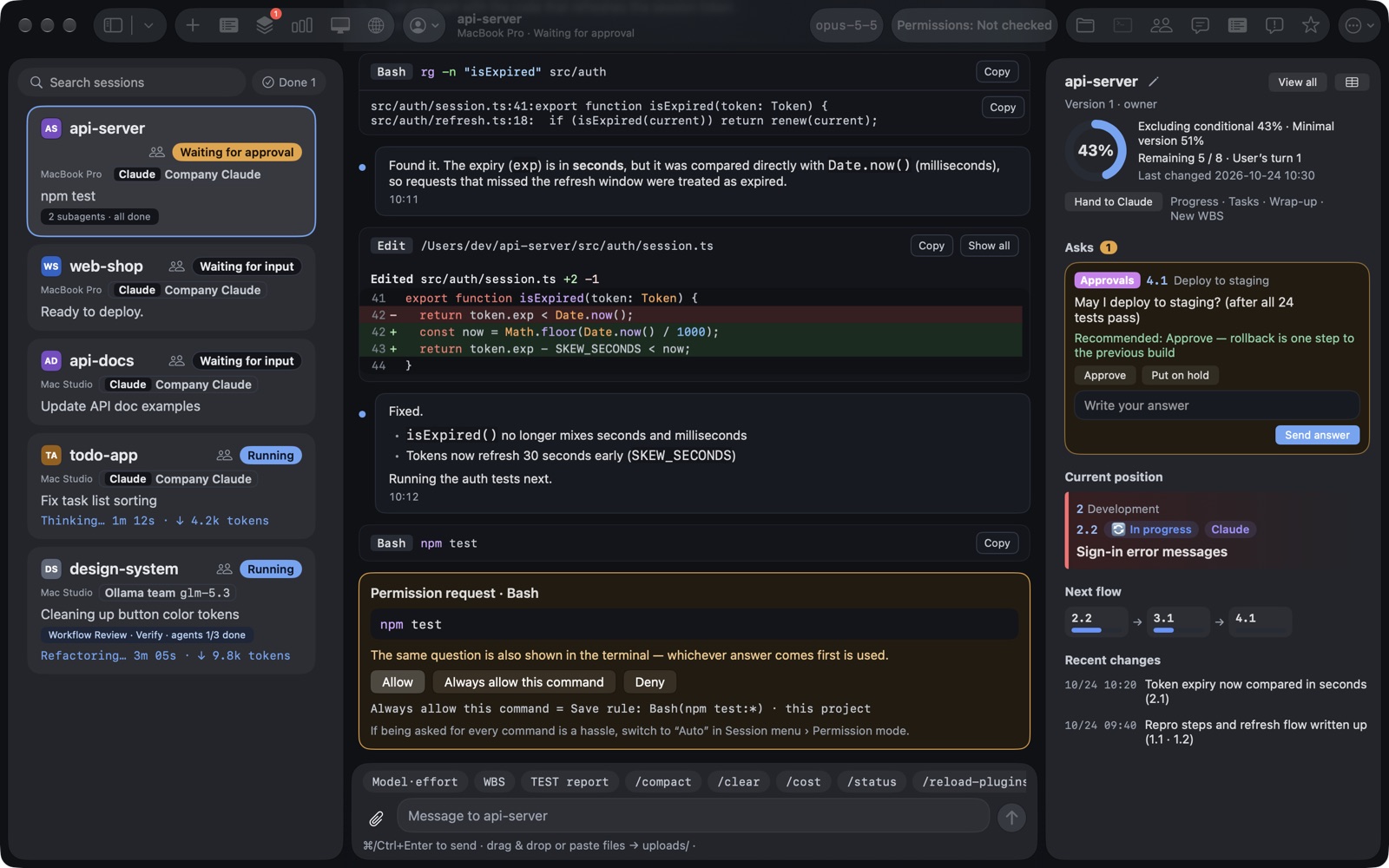
Mac — multiple windows, menus, and shortcuts
Keep the session list, conversation, and right panel (WBS · prompts · issues · skills) in one window, and open the terminal, file explorer, WBS board, and usage in separate windows.
- A different session in each new window (⌘N)
- New session · Find session · Previous/Next session from the menu and keyboard shortcuts
- Session list as a panel, an icon strip, or hidden
- Screen lock ⌃⌘L — locks along with the Mac
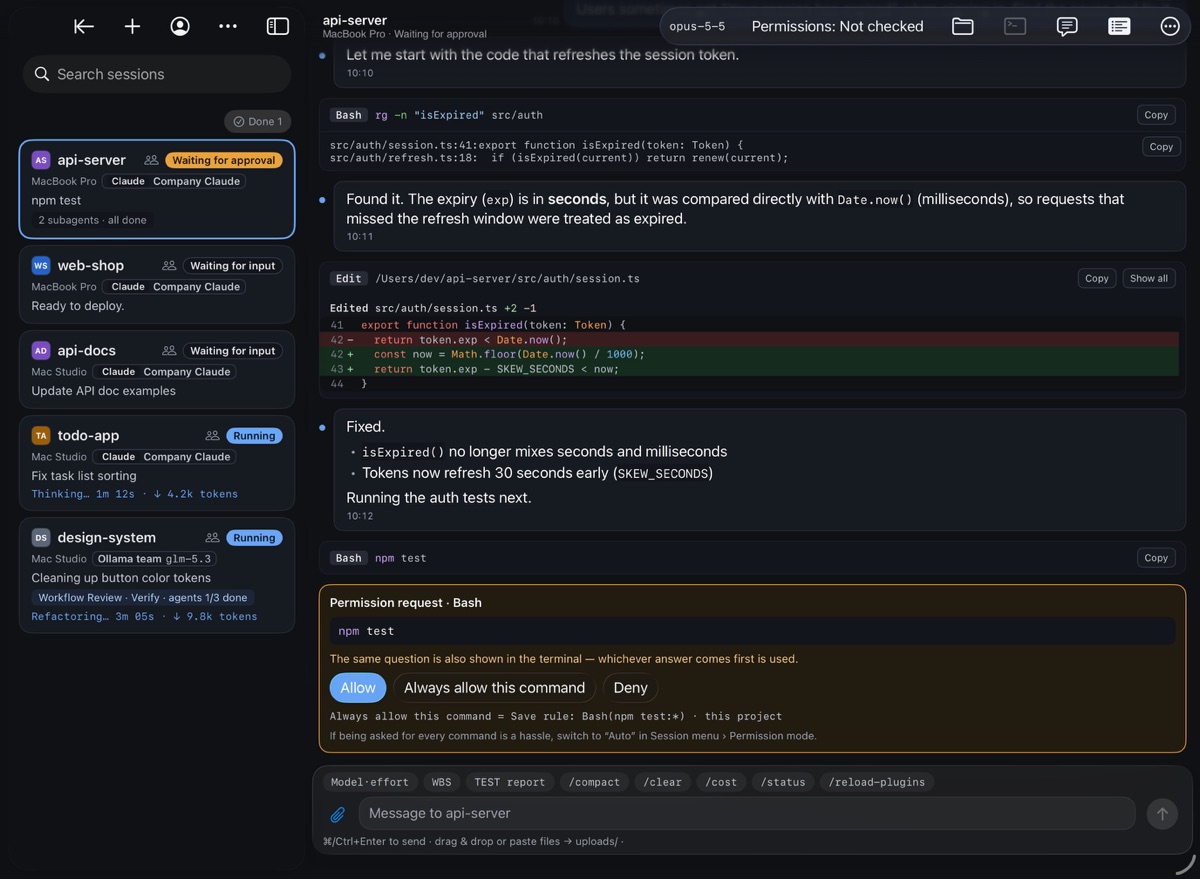
iPad — wide, side by side
In landscape, see the session list and conversation side by side, and open the right panel to view WBS and prompts alongside. In portrait, collapse the session list into an icon strip to give the conversation more room.
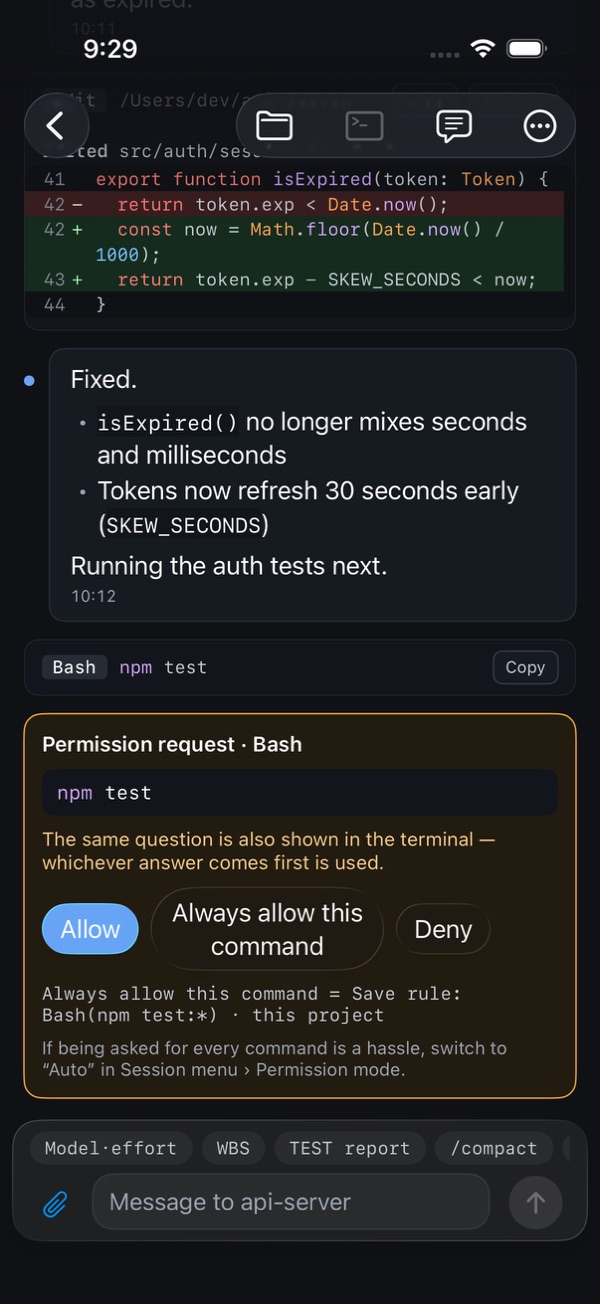
iPhone — one-handed
Pick a session and the conversation fills the screen; answer approval and question cards right there. WBS, prompts, and issues slide up as sheets.
- The same features as the web console — sessions · approvals · questions · prompts · file explorer and code editor · terminal · WBS · tasks · usage · management · session sharing · repository issues · skills
- Use it alongside the web console and it is the same session — answer on one side and the card closes on the other.
- 10 languages · light/dark appearance · the device's text size setting. Arabic reads right to left, while code and paths read left to right.
- It connects only to the company server (HTTPS), with the same ID · password · OTP as the web. We will guide you through installing the app as part of adoption.
What you can do
Do on the web exactly what you did in the terminal. The source of truth is always the conversation files on each Mac; the server keeps a copy for display.
Live conversation view
Watch the conversation, tool calls, results, and subagents live, in the same order as the terminal. Edited files appear as line-numbered diffs, long output is collapsed, and Markdown, mermaid diagrams, and images are rendered. Click an image to view the sharp original from that Mac at full size and zoom with the scroll wheel. Each session also shows the account (Claude or Ollama) it actually uses. Times next to messages and date lines, plus claude's warnings from the terminal (unknown commands, skills, and so on) and command results, appear as well.
WBS viewer
Claude Code records a work plan (phases · items · subtasks), progress, and its current position for each repository, and people see it as a progress summary · progress by phase · next flow · timeline · table. Answer the approvals and decisions Claude asks for right there, and Claude reads your answer on its next turn. Only board members (owner · editor · viewer) can see a board, and every change is kept in the history. If there is no board yet, one button has Claude create it, and you can also have it add tasks, wrap up the plan, or start a new WBS. Each version can be exported as an Excel file (a dashboard · charts, and a hierarchical WBS that rolls up parent progress with formulas).
Permission approvals · Answering questions
When Claude asks for permission to run a command or asks a question, a card appears on the web and on your phone. The same prompt stays open in the terminal, and whichever answer comes first wins. Confirmation dialogs that appear only in the terminal (for example, the background work check on exit) can also be answered from the web.
Prompts · Files · Interrupt
Send long text as is. Drag files onto the input box or paste them, and they are uploaded to the session folder and inserted as @path. Watch the progress line and interrupt just like pressing Esc. What you were typing stays with each session, even after you visit another one.
Mac, iPhone, and iPad app
The SSemBridge app, for use without a browser. It draws its screens natively on the device, following the system's windows, menus, keyboard shortcuts, light/dark appearance, and text size settings, and shows sessions · approvals · questions · files · terminal · WBS · usage · management by the same rules as the web console. On Mac, each window shows a different session, and the terminal, file explorer, WBS, and usage open in separate windows.
New session · Resume
Start new sessions in tmux inside allowed folders, and resume finished conversations. Conversations from folders you only used in the terminal also appear in the resume list (just like claude --continue), and resuming under a different account copies the conversation file to that account.
Model · effort · Permission mode
Change the model and effort mid-session (by default for this session only), and switch among the five permission modes (Default, Accept edits, Plan, Auto, Bypass permissions).
Move session
Move a finished session to another Mac and continue there. The working folder can come along too (excluding folders that can be regenerated), and a progress bar shows each step. Large working folders can be moved up to the size set in the server settings (20GB by default).
Session sharing
Show your session to a colleague or work on it together. Choose what to share — prompts · approvals · prompt list · viewing files · viewing the terminal — and only those items open once the recipient accepts. Each message bubble shows who sent the prompt, and you can see who else is watching right now. When the period ends or you revoke the share, the recipient’s screen and terminal close immediately. Shares start as viewing the conversation only, for 1 hour, and you turn on only what is needed.
Screen lock
Lock the console when you step away. It isn't a cover over the screen — the server locks that browser's or app's sign-in and sends nothing while it is locked. Lock it with a button or shortcut, or it locks by itself after a set time without input; the Mac app also locks when the Mac's screen locks or it goes to sleep. Unlock with your OTP or Face ID · Touch ID · a passkey registered on that device.
File explorer · Editor
Browse, preview, and edit the session folder. Files Claude changes are reflected right away, and deleting only ever moves files to the Trash. Open it in a new window to view files while following the conversation.
Web terminal
Open a developer Mac's shell, or the actual tmux screen of a claude session, on the web. Scroll, drag to select and copy, and clear with ⌘K just like a terminal; the number of scrollback lines is set in Settings. It opens only when enabled locally on that Mac. From a session screen, the “Terminal” button in the header opens it directly.
Prompt list
See only the prompts people typed in that session, newest first. Click one to jump to that spot in the conversation and review from there — even in older history (within the server's retention period).
Session and prompt search
Use the search box above the session list to find sessions on every Mac by name, folder, branch, account, or last message (finished sessions included), and find past instructions in the prompts panel by word or #number. Matches are highlighted.
Session nicknames and pins
Give sessions an easy-to-recognize nickname and image instead of the folder name, and pin the sessions you check often to the top of the list in your own order (by dragging on desktop). Pinned sessions stay in the list even after they finish. Nicknames, images, and pins are stored on the company server, so they are the same on your phone and other computers.
Repository (SSemRepo) issues
Register a company repository for a session folder (the git URL is filled in automatically) to view that project's issues and create, edit, close, or delete them. Attach files by dragging or pasting, and images in the body are shown inline. The repository token stays on that Mac.
TEST report
One button hands app · web · server testing to Claude. Claude tests without touching anyone's screen, keyboard, or clipboard, then posts a report with a description, result, and evidence (screenshots · logs · API definitions) for each case as a repository (SSemRepo) issue and records it on the WBS item. Before you are asked to check anything, you can already see the test results.
Skill deployment
Pick Claude Code skills from your company skill repository (a git repository on SSemRepo) and install them for a session or for a whole account on the Mac. Installed skills can be used right away, even by a claude that is already running, without restarting it. The “Skills” panel shows the skills a session can use; if you placed a skill with the same name yourself, you are asked once more, and replacing it moves the original to the Trash. Each Mac fetches the repository with its own token.
Tasks — background agents
See the background agents and workflows running right now across all sessions on one screen, along with those that finished in the last 24 hours.
Usage dashboard
See account limits with a forecast at the current pace, cost estimates, daily per-model bars, the heaviest sessions, and a day × hour heatmap. Costs are estimates at API rates.
Remote host and account management
Developers connect their own Mac with the one-line install command that “Add host” generates. See the login status of company shared accounts and your own accounts for each Mac and log in from the web; update the Agent remotely with “Update now”.
Conversation backup · Restore
Conversation history and copies of files from before Claude edited them are uploaded to the company server every 10 minutes. See the archive size, free disk space, and backup status per host, and restore what you choose.
Audit log · Retention cleanup · Metrics
Every remote command is recorded: who, which session, what, and the result. Old records are cleaned up according to the retention periods you set, and sensitive values such as tokens are masked. Metrics such as connection latency per host are shown too.
Appearance
Choose the theme (System · Light · Dark), the interface, conversation, and code fonts, and the text size for each area (80–150%) on each device. Upload font files you own under “My fonts” for your own use, and turn on “Keep screen on” so the screen doesn't turn off while you are watching the console.
10 languages
Use the web console in Korean, English, Japanese, Simplified Chinese, French, Spanish, Indonesian, Vietnamese, Khmer, or Arabic. Pick one with the 🌐 button at the top; Arabic is displayed right to left. The app's sign-in and lock screens, and this site, let you choose the same languages and themes.
How you'll use it
Connect your developers' Macs to a single company server. Developers simply keep using claude inside tmux, as they always have.
Install on your company server
Host the relay server (web application server · database) on-premises. The web console sits behind your company's HTTPS proxy, and Agent connections are opened only inside the internal network.
Developers connect their own Macs
Once an admin creates a developer account (temporary password — OTP and a new password at first login), the developer pastes the one-line install command made with “Add host” (single-use enrollment code, valid for 15 minutes) into their own Mac's terminal.
Carry on from anywhere
claude sessions launched in tmux show up on the web. Follow the progress from desktop or phone, and approve, answer, give the next instruction, or interrupt.
How it works
The Agent on each Mac reads claude's conversation files and hooks, sends them to the company server, and types commands from the web into tmux. Because the Agent connects out to the server, no ports need to be opened on the Mac.
- The source of truth is the conversation files on each Mac. The server only keeps a copy for display, so even after a server restart, the Agent resends from where it left off and fills it back in.
- One-way connection from Agent → server — the server never connects into the Mac. Commands arrive over the same connection and are typed into tmux.
- Hooks are received on 127.0.0.1 only. Even if the Agent is down, claude is not slowed down (it gives up within 1 second).
- The web console sits behind your company's HTTPS proxy and opens only after login + OTP; every remote command is recorded in the audit log.
Single Go binary
Runs on each Mac under launchd. Tails conversation files · receives hooks · controls tmux · updates remotely.
SSemiYa F/W
Web Application Server
WebSocket relay, REST, audit log, conversation backup storage. Installed on-premises.
Vanilla JS · SwiftUI
The web uses no build tools and no external resources. The Mac, iPhone, and iPad app connects to the same server and draws its own screens, checked against the same test data to follow the same rules as the web.
Database
Display copy of conversations, account and model catalog, usage, audit log.
Security principles
Because this tool runs commands remotely on developers' Macs, we drew the lines it must never cross before building it.
- All relaying and storage for remote control happen on the company server — never through an outside cloud service.
- Macs only open outbound connections to the company server — there are no inbound ports.
- Account secrets (Claude tokens, Ollama keys) stay only on each Mac. The server never stores them.
- Company repository (SSemRepo) tokens are also kept only on each Mac — the server masks them even in the audit log, and the Agent sends a token only to the repository server over HTTPS and never follows redirects. The skill repository (git) is fetched with the same token, only on that Mac and never placed on the command line.
- Host enrollment codes and tokens are stored only as hashes, and an enrollment code can be used once, within 15 minutes.
- Agent connections are not exposed through the external proxy and are accepted only from the internal network (VPN).
- The web console always requires an ID, password, and OTP. Each developer sees and controls only the sessions on their own Macs; admins handle only users · company shared accounts · settings and do not see other people's Macs · sessions · conversations.
- Someone else’s session is available only when its owner shares it and you accept, and only for the items granted. For people a session is shared with, the server blocks shell commands (
!) · “Always allow” · changing the permission mode, and the terminal is view-only (only the owner can type). - Company shared accounts appear only on the Macs of the people an admin chooses. Personal accounts are seen and used only by their owner.
- New sessions open only inside allowed folders, and the Agent performs the final check on file paths (anything outside the session folder,
.git, or.claudeis rejected). - Every remote command is recorded in the audit log (who, which session, what, and the result).
- The web terminal opens only when enabled locally on that Mac (it cannot be enabled from the web), and asks the Mac's owner for an OTP again each time it is opened. Opening, closing, and byte counts are recorded in the audit log, but keystrokes are not, and it closes after 30 minutes without input.
- Token-like values are masked wherever they appear on screen or in records.
- Even when several people share one Mac, hooks are received over a socket only that macOS user can open — they never reach someone else's Agent.
- The web console loads no external scripts or fonts (CSP), and uploads have their size and path checked twice.
- The Mac, iPhone, and iPad app connects only to the company server (HTTPS) that the user entered, and goes through the same ID · password · OTP as the web. Screen modules sent by plugins (mods) run only inside an isolated view with network access blocked.
Requirements
What SSemBridge needs to run.
- Each Mac needs macOS and tmux. Sessions launched outside tmux (in a regular terminal) are view-only; reopen them with “Resume in tmux” on the web to control them.
- The company server needs a web application server (WAS) and a database. The web console goes behind your company's HTTPS proxy, and Agent connections are opened only inside the internal network (VPN).
- Claude Code and Ollama accounts are the ones already in use on each Mac. Accounts and billing remain subject to your existing agreements with each service.
- The Mac, iPhone, and iPad app runs on macOS, iOS, and iPadOS 26 or later. We will guide you through installing the app as part of adoption.
- Claude Code's log format, hooks, and screens change from version to version. The Agent is updated to match verified versions (currently 2.1.288–2.1.300), and updates are pushed to each Mac with “Update now” on the web.
- Usage costs are estimates at API rates. They are not subscription fees or actual billed amounts.
- The Agent runs while that Mac user is logged in. When several people share one Mac, keep them logged in together with fast user switching.
Better with SSemRepo
SSemRepo is an on-premises code repository built by Levelupsoft — git and Subversion repositories, issues, pull requests, code review, and wikis. Run it on the same company server as SSemBridge, and code, issues, and remote development come together in one flow inside your company. Your company's Claude Code skills can also be collected in an SSemRepo repository and installed for sessions and accounts as needed.
Issues right beside your sessions
Register an SSemRepo project for a session folder to view that project's issues right beside the conversation where Claude Code is working — and create, edit, close, and attach files to them. The project URL is filled in from the folder's git remote.
Claude Code works with issues, too
SSemRepo's command-line tool (ssemhub) is built to work alongside AI coding tools. Claude Code in a session reads issues, posts comments, and links commits to issues.
Repository tokens stay on each Mac
SSemRepo access tokens are kept only on the developer's Mac, and that Mac's Agent talks directly to the repository server over HTTPS. The SSemBridge server does not store tokens.
Considering SSemBridge for your team?
Tell us how many developers you have and about your Mac and server environment, and we will recommend the right setup. Contact us for pricing and terms as well.
Contact salesOn-premises installation by default · Levelupsoft Inc.